remover.bg is an AI-powered online tool that removes the background from any photo in seconds. You upload an image, the AI separates the subject from the backdrop, and you download a clean cutout. It runs in the browser, so there is nothing to install and no sign-up to try. This tour walks through every part of the product, feature by feature.
The tool is more than a single button. It pairs a fast AI cutout with a built-in editor, flexible export formats, free daily tiers, an HTTP API for developers, and an Android app. Privacy sits underneath all of it, because each file you send is handled solely to complete that one job.
How Does the Three Step Flow Work?
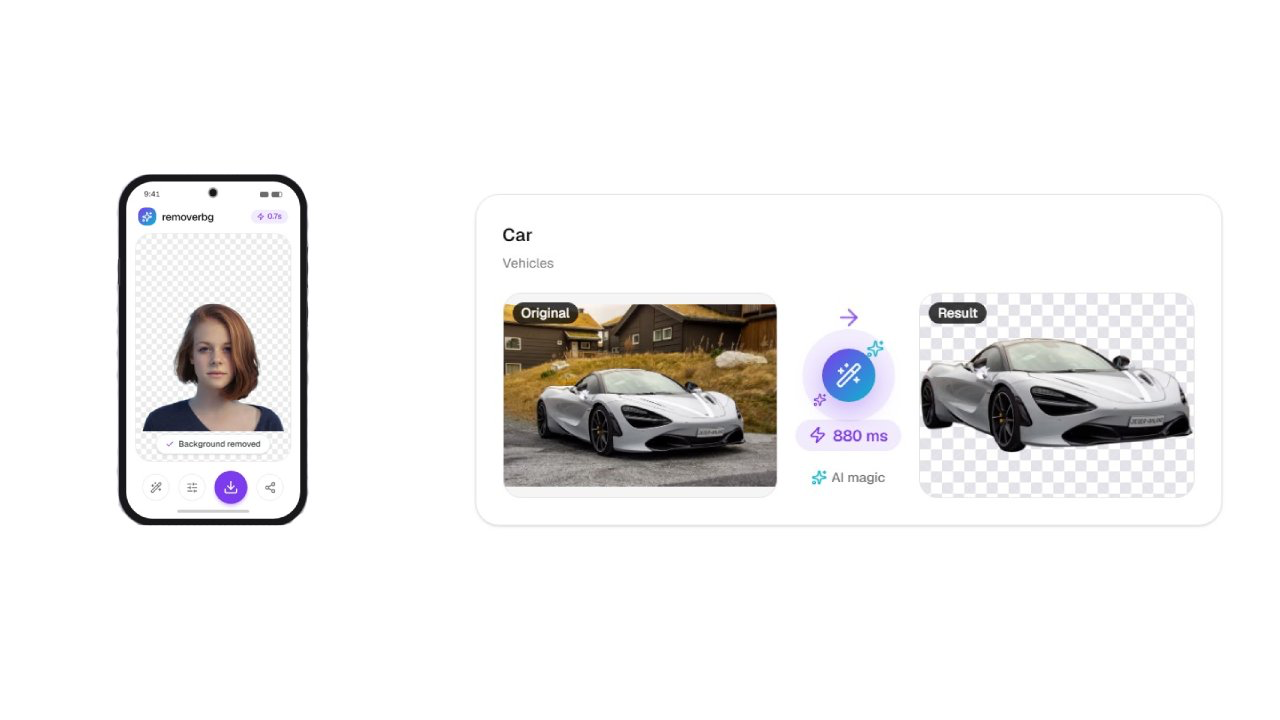
The core of removerbg is a short, repeatable flow. You upload, the AI removes the background, and you download the result. Each step takes moments, and the whole cutout finishes in seconds, and published examples clock in around 0.7 seconds, roughly 880 milliseconds.
- Drop in or click to add a WebP, JPG, or PNG image, each one capped at 10 megabytes.
- Let the AI analyze the photo and separate the subject from the background per pixel.
- Download the transparent PNG, or move on to the editor for finishing touches.
The deep-learning model judges every pixel independently, so hair, fur, and fine detail keep clean edges. You do not trace outlines or use a manual eraser.
What Can You Do in the Built-In Editor?
After the AI cutout, the editor gives you room to finish the look in the same browser tab. You refine the subject and its scene before you export, without switching to heavy software.
- Place a new background, whether a solid color or a fresh image.
- Reposition and resize the subject on the canvas.
- Add a shadow so the subject sits naturally in its new scene.
- Export the final image in your chosen format and quality.
Everything on this tour lives in one place, so you can open remover.bg and move from raw upload to finished export without any other program.
Which Formats and Sizes Does the Tool Support?
removerbg takes the everyday web image types and leaves plenty of room on file size. The table below shows what you can bring in and what you can take out of the tool.
| Stage | Formats | Notes |
|---|---|---|
| Upload | PNG, JPG, WebP | Files up to 10 MB each |
| Download | Transparent PNG | Keeps full transparency |
| Export | JPG or WebP | Flat background or new scene |
A transparent PNG drops cleanly onto any color or layout in your design tool. If you prefer a solid background or a smaller file, JPG or WebP export covers that need. You choose the format and quality at the download step.
What Do the Free Tiers Include?
No account is needed to give removerbg a first run. The free tiers let you test real cutouts before you commit to anything, and paid plans add higher volume and API access for larger work.
- Three cutouts a day with no registration or login.
- 20 removals per day with a free account.
- Transparent PNG downloads on every tier.
- The same AI quality across free and paid usage.
How Does the HTTP API Fit In?
For developers, removerbg offers an HTTP API on paid plans. The API runs the same background removal in an automated pipeline, so you process large image libraries without manual clicks. This suits stores, catalogs, and any workflow that handles photos in bulk.
Instead of opening each image by hand, your code sends files to the endpoint and receives cutouts back. That keeps a product feed or a batch of listings moving at scale.
What Does the Android App Add?
removerbg also ships an Android app that runs the same AI on your phone. It brings the cutout workflow to mobile, so you can clear a background right after you take a photo. The app fits sellers, creators, and anyone editing on the go.
- The same deep-learning cutout you get on the web.
- Credits shared with your web account, so usage stays in one balance.
- History synced across devices, so past edits follow you.
- A mobile-first flow for photos taken on the phone.
How Does the Tool Protect Your Privacy?
Privacy runs through the whole product. removerbg handles every image strictly for the job you asked for, and nothing you upload feeds model training. You keep full ownership of your content, and commercial use is allowed once you download the cutout.
That means a portrait, a product shot, or a client file stays yours from upload to export. You can place the result in listings, ads, or printed work without extra steps. The privacy stance applies whether you use the free tier, a paid plan, the API, or the app.
Frequently Asked Questions
Do I need to install anything to use removerbg?
No. removerbg runs in your browser, so there is nothing to download for the core tool. You open the site, add a WebP, JPG, or PNG image, and the AI clears the background in seconds. If you prefer mobile, an Android app runs the same AI and shares credits and history with your web account, so your usage stays in one place.
Can I edit the cutout after the AI removes the background?
Yes. A built-in editor opens in the same tab after the cutout. You can place a new background, reposition and resize the subject, and add a shadow so it sits naturally. When the image looks right, you export it in your chosen format and quality. The whole process happens in the browser without any other software.
Is there an API for bulk or automated work?
Yes. removerbg offers an HTTP API on paid plans. It runs the same background removal in an automated pipeline, so your code can process large image libraries without manual clicks. This suits online stores, catalogs, and any workflow that handles photos in bulk. The API turns the browser tool into a building block inside your own software.
What can I do with the finished cutout?
A lot. removerbg allows commercial use, and you keep ownership of your content. You can place a transparent PNG in marketplace listings on Amazon or eBay, polish a LinkedIn or resume portrait, or drop art into Canva, Figma, or PowerPoint. Creators also use cutouts for stickers, thumbnails, and printed cards, all from the same fast workflow.