
Online communication has gone a long way. Every day, people communicate, watch, and produce content using the games, video calls, and social media. Due to this reason, voice changing tools have gained a lot of popularity. A lot of individuals desire to alter their voice to simply make their identity discreet or to have fun when chatting.
One great tool for this is iTop Voicy. It is real-time AI voice changer to PC which allows altering voice in real-time as you speak. There is no need to record and edit. Your voice changes live during your conversation with this tool.
Here you will learn about what iTop Voicy is and how to easily set it up step by step for gaming, streaming, and chatting online.
What Is iTop Voicy?
iTop Voicy is a voice-changing program made for Windows computers. It is an AI that transforms your voice instantly. The software will process the sound that you get on-the-go when you speak into your microphone. You can use iTop Voicy in many ways, like
- Chatting while playing online games
- Live streaming
- Voice calls or meetings
- Recording voice-overs
- Making social media videos
You can also experiment with various voice styles, unlike sounding constant in this program. You may speak like someone, you may alter your tone or keep your natural voice as a secret when you wish.
The program is user-friendly. Therefore, with this type of software, even people who are not familiar with its use can start immediately.
Key Features of iTop Voicy You Must Know
Before you install it, here are some of the main features that make iTop Voicy great for fun and creative use.
Change Your Voices in Real Time
The best part is that it changes your voice instantly while you speak. There is no waiting or lag, so your voice sounds different right away.
You can change different parts of your voice like
- How old you sound
- Whether your voice sounds more like a man or a woman
- The pitch (how high or low your voice is)
- The overall voice style
Because the AI changes your voice immediately, there is no delay. This is especially important when you are gaming or streaming live, where timing is a key.
Large Selection of AI Voices and Effects
iTop Voicy provides a substantial number of sound effects and voice styles to select. These voices are suitable to various moods and situations. For example, you may choose voices which are robotic such as a cartoon character, high and dramatic such as in movies, or light and amusing.
It is extremely easy to switch between voices with a single click. This will allow you to easily experiment with the various voices to get the best voice to use that suits your content. You can also include sound effects in order to make your talks more entertaining or humorous.
Convert Your Audio or Video Files Quickly
Besides changing your voice live, iTop Voicy can also change voices in audio or video files. This is great if you want to
- Replace narration in a video
- Make character voices for stories
- Create fun and creative edits for social media
The software will create a new file with your chosen voice within no time.
Studio-Quality Recording with Noise Reduction
iTop Voicy also has a built-in recording feature. You can record your voice using any voice style you like. One great part is the noise reduction system. It automatically removes background noise and echo. So, your recordings sound clear and professional.
This is perfect for voice-overs, podcasts, audiobooks, and commentary videos. You don’t need extra editing tools to make your audio sound clean.
Create A Custom Voice Model
You are even able to make your unique voice styles. You can simply use the preset voices. You can also create your custom voice using a sample and adjusting various sound settings.
Pitch, timbre, emotion and general voice tone can be adjusted easily with this tool. Once you create the voice of your liking, save it, assign it a name and add it to your artist voice library.
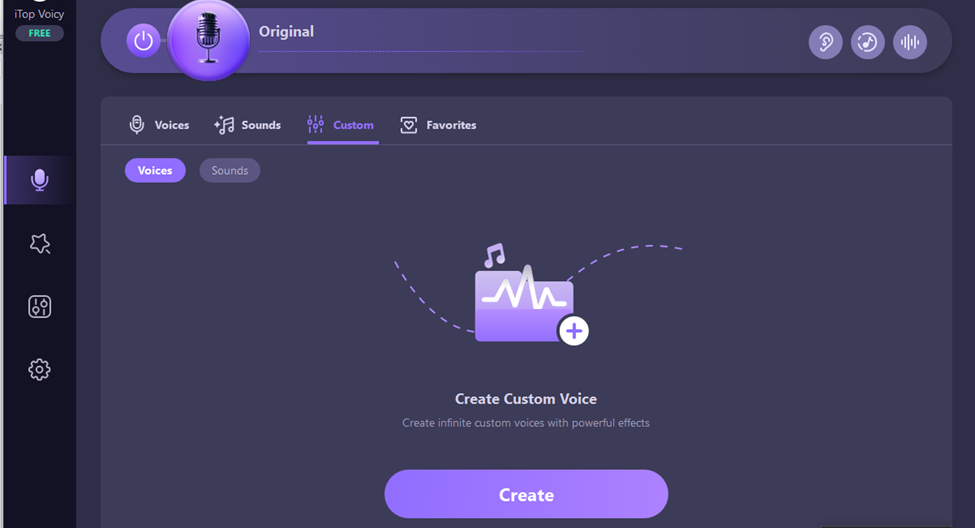
It is an excellent feature for creators who desire to have a unique voice that is uniquely theirs.
Works with Games, Streaming Apps, and Chat Programs
iTop Voicy works with lots of apps that use your microphone. You can use it with
- Online games
- Streaming software
- Voice chat apps
- Video meeting platforms
All you need to do is set iTop Voicy as your microphone in these apps, and your changed voice will be heard by others. This makes it easy to use the voice changer for PC in many parts of your online life, whether you are gaming, streaming, or chatting with friends.
How to Set Up iTop Voicy to Turn Your Voice Into Any Character?
Getting started with iTop Voicy is easy! Just follow these simple steps:
- Download and Install
Go to the official iTop Voicy website and download the installer. Follow the instructions to install the program. Once done, open the app. This usually takes a few minutes only.
- Set Up Your Microphone
When the program opens, go to the audio settings. Choose your microphone from the list. Speak a little to check if the input meter moves. If it moves, your microphone is ready to use.
- Pick a Voice Style
Browse the voice library inside the app. Click on a voice to hear how it sounds. When you find one you like, select it. From now on, your voice will change to the style you picked whenever you talk.
- Connect iTop Voicy to Your Game or Chat App
Open the game or chat app you want to use. Go to its audio or microphone settings. Set iTop Voicy as your microphone. Now, when you speak, people will hear your changed voice instead of your real one.
- Record or Change Audio Files (if needed)
If you want, you can use iTop Voicy’s recorder to capture your voice. Or, you are allowed to import an audio file or video to modify the voice in it. Once the file has been recorded or edited, save it to your computer.
It does wonders at voice-overs, as a way to tell a story or create a social media fun video.
Final Words
Voice communication is now a large component of the communication sources on the Internet. Changing your voice can make things more fun and interesting. iTop Voicy makes it easy to change your voice live. It uses smart AI voices and lets you change voices in audio files and even create your own unique voice styles.
If you want to try out different voices and add some creativity to your online talks, iTop Voicy is a great choice.