The way we start our browsing session can affect our productivity more than we realize. Every day, people open dozens of browser tabs while working, studying, or researching online. The question is simple: should you rely on a traditional custom homepage or use a modern new tab extension?
Both options aim to make browsing easier, but they work very differently. A custom homepage usually loads when you open the browser, while a new tab extension transforms every new tab into a useful workspace.
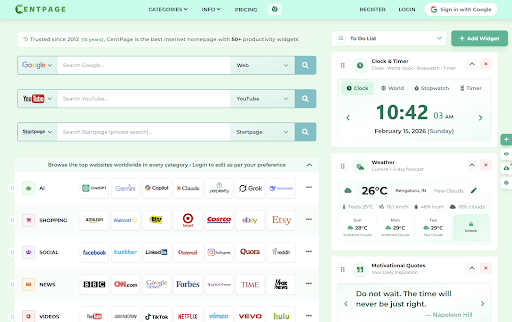
In recent years, productivity focused browser tools have become more popular, especially extensions that turn the new tab page into a smart dashboard. Tools like the CentPage Chrome extension are designed to replace the empty tab with a customizable command center where everything you need is just one click away.
Let’s explore which option truly wins when it comes to efficiency, convenience, and productivity.
Understanding the Traditional Custom Internet Homepage.
For many years, internet users relied on a custom homepage. This is the page that automatically opens when you launch your browser. People often set it to search engines like Google or to their favorite news websites.
A custom homepage has a few advantages:
- Quick access to a preferred website
- Simple setup in browser settings
- Familiar browsing experience
However, the biggest limitation is that it only appears once when the browser opens. After that, whenever you open a new tab, you still get a blank page or the default browser screen.
This means the homepage doesn’t help much during the actual browsing session when you are constantly opening new tabs.
For users who spend hours online students, professionals, developers, and researchers this limitation becomes noticeable. The homepage might start your session, but it doesn’t actively support your workflow.
What Is a New Tab Extension?
A new tab extension replaces the default blank tab with a customized interface filled with useful tools, links, and widgets.
Instead of opening a plain page, every new tab becomes a productivity dashboard. This dashboard can include bookmarks, search tools, notes, weather updates, task lists, and much more.
Modern solutions like the CentPage Chrome extension take this concept further by transforming the new tab page into a complete digital workspace.
Rather than switching between multiple websites or tools, everything is available inside the tab itself. This saves time and reduces distractions.
A well designed new tab extension can help users:
- Access bookmarks instantly
- Manage daily tasks
- Check weather and calendar events
- Take quick notes
- Use productivity tools without leaving the page
Because the new tab is opened dozens of times each day, turning it into something useful can dramatically improve efficiency.
Productivity Impact: Why the New Tab Matters.
Think about how often you open a new tab while browsing. For many users, it happens 50 to 100 times per day.
If every one of those tabs opens a blank page, that space is essentially wasted. But if that space becomes a productivity hub, it can help organize your entire workflow.
A smart new tab dashboard can act like a personal operating system inside the browser. Instead of jumping between apps and websites, your most important tools are already visible.
For example, a productivity focused start page can provide:
- Sticky notes for quick reminders
- To do lists to manage tasks
- Quick access bookmarks
- A calendar overview
- Instant search tools
Platforms like the internet homepage highlight how replacing the default tab with a smart dashboard can reduce wasted clicks and improve daily efficiency.
The concept is simple but powerful: use the space you already open frequently to help you stay organized.
Customization and Flexibility.
Another major difference between a traditional homepage and a new tab extension is customization.
A homepage usually shows one specific website. While you can change the homepage URL, you cannot easily personalize its layout unless the website itself allows customization.
New tab extensions, however, are designed to be flexible.
Modern dashboards allow users to:
- Rearrange widgets
- Add or remove tools
- Organize bookmarks visually
- Switch between different layouts
- Enable focus or distraction free modes
This level of customization allows the browser start page to match each person’s workflow.
For example, some people prefer a minimal focus environment, while others like a full dashboard showing multiple widgets at once.
Productivity tools such as CentPage offer both Focus Mode and Dashboard Mode, giving users control over how much information they want to see.
This flexibility makes new tab extensions far more adaptable than traditional homepage setups.
The Rise of Browser Based Productivity Tools.
The modern internet user spends a large portion of their day inside a browser. Work applications, research tools, communication platforms, and entertainment services all run in browser tabs.
Because of this shift, many productivity solutions are now being built directly for browsers.
Instead of installing multiple standalone apps, users can rely on browser dashboards that combine many functions into one interface.
Advanced new tab tools can include dozens of built in widgets such as:
- task managers
- Note taking tools
- habit trackers
- financial calculators
- news feeds
- weather updates
- typing tests and productivity timers
These features turn the browser into a central control panel for daily digital life.
The CentPage ecosystem continues to expand these capabilities, and users can stay updated about new features and improvements by choosing to Follow CentPage on Twitter, where updates and productivity tips are shared regularly.
This growing ecosystem shows how new tab extensions are evolving into complete productivity platforms.
Which One Wins?
When comparing a traditional custom homepage with a new tab extension, the winner becomes clear when productivity and usability are considered.
A custom homepage is simple and familiar, but it only appears once when the browser launches. After that, it offers little support during your browsing session.
A new tab extension, on the other hand, works every time you open a tab. That means it actively helps you throughout the entire day.
Key advantages of new tab extensions include:
- Constant accessibility
- Built in productivity tools
- customizable layouts
- faster navigation
- better organization
Instead of being just a starting page, the browser becomes an interactive workspace.
For users who want to save time, stay organized, and reduce digital clutter, modern new tab dashboards clearly provide more value.
Final Thoughts.
The internet has evolved far beyond simple browsing, and the tools we use should evolve as well.
While custom homepages once served as the primary entry point to the web, they are now limited compared to the dynamic capabilities of modern browser extensions.
New tab dashboards transform the most frequently used page in a browser into a smart productivity center.
By combining bookmarks, notes, tasks, widgets, and useful tools into a single interface, solutions like CentPage demonstrate how powerful a simple tab can become.
Instead of opening a blank page dozens of times a day, users can turn every new tab into a meaningful step toward better organization and productivity.In the long run, the real winner is the tool that helps youwork smarter, not harder and for many users today, that tool is the modern new tab extension.