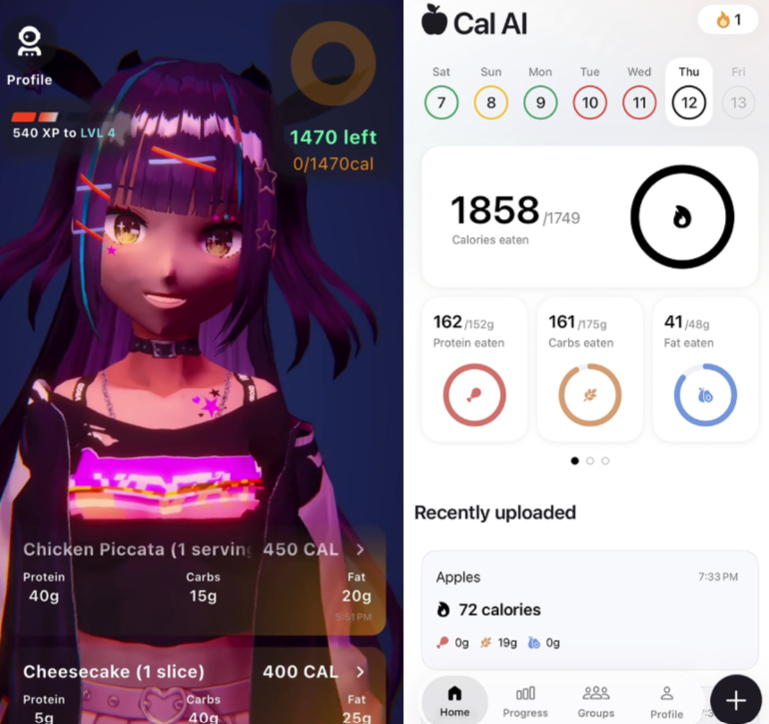
AI calorie trackers promise to replace database searches with one quick photograph. That is attractive to beginners, who often abandon food logging because the setup feels like another job. Coach Ivy and Cal AI both start from this easier photo-first idea, but they package it differently.
The short answer is that Coach Ivy suits beginners who want a gentle, character-led habit and on-device photo logging. Cal AI may appeal more to people who want a larger social and wearable ecosystem. Neither removes the need to check portions, sauces or cooking methods.
| Feature | Coach Ivy | Cal AI |
|---|---|---|
| Core experience | Character-led coaching | Broader feature-led tracker |
| Photo logging | On-device photo analysis | Photo analysis; scanning requires a subscription |
| Apple Watch | Not highlighted | Supported |
| Social features | Not highlighted | Public groups |
| Best fit | Beginners who want gentle motivation | Users who want wearable and social features |
The core workflow is similar
Both apps ask the user to photograph a meal and return estimated calories and macronutrients. This reverses the traditional tracking workflow. Instead of searching for every ingredient before seeing a total, the user reviews an AI-generated first draft.
That speed matters. A beginner is more likely to record an ordinary lunch when the first step takes seconds. However, the camera cannot see oil absorbed during cooking, sugar hidden in a drink or the exact depth of a bowl. Photo logging is therefore best treated as an informed estimate rather than a laboratory measurement.
Coach Ivy focuses on a guided habit
Coach Ivy combines photo logging with an expressive character coach. The idea is to make returning feel like a friendly check-in instead of opening a clinical dashboard. Its public product information describes an iPhone app with on-device photo analysis and an emphasis on everyday awareness.
That approach can help a beginner who understands the basic goal but struggles with consistency. An AI calorie tracker like Coach Ivy is most useful when the user wants to reduce logging friction while keeping the routine approachable.
The character-led design will not suit everyone. Some people want numbers with as little personality as possible. Beginners should decide whether encouragement makes the task easier or simply adds visual noise.
Cal AI offers a broader visible ecosystem
Cal AI also builds the experience around meal photographs and a personalised plan created from lifestyle questions. Its current App Store listing highlights iPhone and Apple Watch support, multiple languages and public groups. Those additions may appeal to users who enjoy shared accountability or want nutrition tracking connected to a wearable.
The same listing says food-scanning analysis requires a subscription. Pricing and promotions can change, so users should check the offer shown on their device, the renewal period and the cancellation terms before beginning a trial.
Cal AI’s larger collection of visible features can feel reassuring, but a beginner does not necessarily need all of them. The important question is whether the extra ecosystem supports the habit the person actually wants to build.
Correction speed matters more than the first result
No photo-calorie app will identify every mixed meal correctly. A useful beginner test is to photograph three different foods: a simple snack, a homemade mixed dish and a restaurant meal. Then try to change the portion, cooking method and any hidden sauce.
The winning app is not always the one that produces the most confident first number. It is the one that lets the user correct an uncertain result without navigating several screens. A slightly imperfect draft that takes ten seconds to fix is more practical than an impressive-looking estimate that is difficult to edit.
Beginners should also look for neutral language. Estimates should be presented as adjustable information, not moral judgements about whether a meal was “good” or “bad.”
Privacy deserves an early check
Meal photographs can reveal faces, location details, workplace badges or medication in the background. Coach Ivy says its photo logging runs on-device, which may be attractive to privacy-conscious users. Cal AI’s App Store privacy disclosure lists several categories of data that may be handled and says identifiers and usage data may be used for tracking.
These disclosures are not a complete security audit, and policies can change. Before committing, check whether photographs leave the device, how long meal history is retained and whether the account offers export and deletion controls. Crop unrelated details from photographs regardless of which app you choose.
Which app is the better beginner fit?
Choose Coach Ivy if you want a friendly character, a lighter habit-building experience and on-device photo logging. It is the more distinctive option for someone who has found conventional calorie dashboards cold or tedious.
Choose Cal AI if Apple Watch support, public groups, language availability and a broader established feature set matter more to you. Be comfortable reviewing the subscription terms required for its scanning workflow.
Whichever app you try, use the first week as a test rather than a commitment. Ask whether you logged more consistently, whether corrections were easy and whether the experience made you curious rather than anxious. People managing diabetes, kidney disease, eating disorders or other clinical nutrition needs should use guidance from an appropriate healthcare professional.
For a beginner, the best AI calorie tracker is not the one with the longest feature list. It is the one that makes honest, editable logging simple enough to repeat after the novelty of photographing lunch has disappeared.