In today’s connected world, reaching audiences across borders means more than just translating words—it requires voices that feel authentic and relatable. Whether you’re creating marketing videos, e-learning modules, or podcasts, mismatched accents can break immersion and reduce engagement. Enter the accent generator, a game-changing AI tool that lets you produce natural-sounding voiceovers tailored to any region.
With the accent generator from AI Dubbing, content creators can instantly convert text into professional audio featuring realistic accents. This isn’t robotic speech; it’s deep-learning text-to-speech technology that captures pronunciation, rhythm, and tone for voices that sound genuinely human. In this guide, we’ll explore how an accent generator works, its real benefits, practical applications, and tips to get the most out of it—helping you create content that resonates worldwide without hiring expensive voice talent.
What Is an Accent Generator and Why Does It Matter?
An accent generator is an advanced AI-powered tool designed to simulate authentic regional speech patterns in voiceovers. Unlike basic text-to-speech software that produces flat, generic audio, this accent generator uses state-of-the-art models to replicate nuances like the crisp British “r” sounds, the relaxed Australian drawl, or the melodic Indian inflections.
The technology behind it relies on deep learning to analyze vast datasets of native speakers. This results in output that feels natural, making it ideal for global projects. For instance, a U.S.-based marketer targeting European customers can switch accents seamlessly, boosting trust and connection.
Accents influence perception more than you might think. Studies show listeners respond better to familiar speech patterns, leading to higher retention rates in videos and courses. An accent generator bridges this gap affordably, eliminating the need for multiple recording sessions or actors. It’s perfect for solo creators, small teams, or large localization efforts where consistency across campaigns matters.
How Does an Accent Generator Work?
Using an accent generator is straightforward and requires no special equipment or expertise. Here’s the simple process:
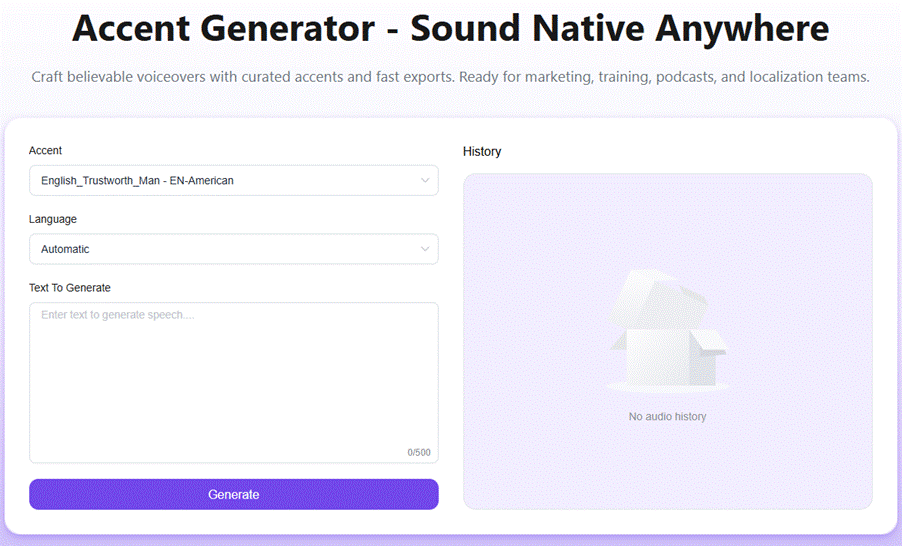
- Select Your Accent: Browse a library of global options, including English variants like US, UK, Australian, and Indian accents, plus various European styles. Each choice ensures clear, natural delivery tailored to your target audience.
- Input Your Text: Paste in scripts, dialogues, instructions, or full paragraphs. The tool handles everything from short product descriptions to lengthy training modules—up to hundreds of characters at once.
- Generate and Preview: Hit the generate button for an instant audio preview. Listen for flow and tone, then tweak the text if needed. Once satisfied, export the file in high-quality formats compatible with video editors, podcast platforms, or apps.
The entire workflow takes seconds, thanks to optimized AI processing. No downloads or installations required—just a browser and your ideas. This accent generator even includes a history feature to revisit past generations, streamlining revisions for ongoing projects.
Key Benefits of Using an Accent Generator
The advantages go far beyond convenience. First, it slashes production time and costs. Traditional voiceover work can take days and thousands of dollars per project. With an accent generator, you cut editing time in half while achieving studio-quality results—far more affordable than booking multiple actors.
Second, it ensures consistency. Localization teams love how quickly they can adapt campaigns for different regions without re-recording. A single accent generator session maintains brand voice across markets, from U.S. English for domestic videos to UK variants for international ads.
Third, it boosts accessibility and engagement. E-learning designers use it for pronunciation training, where students replay authentic accents to master differences between US and UK speech. Podcasters reach niche audiences by matching regional tones, increasing listener loyalty. Marketers report better conversion rates when voiceovers feel native to viewers.
Finally, the output quality shines. High-fidelity audio layers perfectly with background music or effects, and exports work seamlessly in tools like Adobe Premiere or Audacity. For creators on a budget, this accent generator democratizes professional audio production.
Real-World Use Cases That Deliver Results
Consider a YouTube content creator producing travel vlogs. Instead of generic narration, they use the accent generator to add Australian flair for Outback segments or British polish for London guides. Viewers feel more immersed, leading to longer watch times and stronger community bonds—as one creator noted, it transformed their editing workflow.
English teachers leverage it for classroom materials. Students practice listening to Indian or European accents in simulated conversations, improving comprehension without native speakers present. The tool’s repeat-playback feature makes it a go-to for pronunciation drills.
In e-learning, course designers create multilingual modules on a dime. One team narrated an entire business training series with varied accents, making content feel personalized for global employees. The result? Higher completion rates and positive feedback on clarity.
Localization managers in marketing departments switch accents mid-campaign effortlessly. No more scheduling conflicts—just minutes in the accent generator to adapt audio for targeted ad placements. Audio producers appreciate the timing precision, which holds up even when layering tracks for paid media.
These examples highlight versatility: from apps and creative projects to corporate training, the accent generator fits any audio need.
Step-by-Step Tutorial: Getting Started with Your First Voiceover
Ready to try it? Follow these steps for flawless results:
- Visit the tool and choose an accent from the library—start with US English for familiarity.
- Type or paste your script into the text box. Keep sentences varied for natural rhythm.
- Click “Generate” and listen to the preview. Adjust pacing by shortening or lengthening phrases if the flow feels off.
- Once approved, download the audio file. Import it into your editing software and sync with visuals.
- For batch work, use the history tab to pull up previous outputs and refine them.
Experiment with multiple accents in one session to compare options. This accent generator’s speed makes iteration painless, turning what used to be a bottleneck into a creative strength.
Pro Tips for Maximizing Your Accent Generator Results
To elevate output quality, read scripts aloud first for conversational tone. Avoid overly complex sentences, as they can affect AI pronunciation. Pair the accent generator with background music tools for polished podcasts—its clean exports ensure sync without glitches.
Test accents on small samples before full scripts to gauge audience fit. For commercial projects, confirm usage aligns with your needs, as the tool supports professional applications. Finally, combine it with related AI audio features like translation or editing for end-to-end workflows.
Frequently Asked Questions About the Accent Generator
What is an accent generator exactly?
It’s an AI tool that turns text into speech with realistic regional accents, using advanced models for natural-sounding results.
Which accents can the accent generator create?
It supports popular English variants (US, UK, Australian, Indian) and European styles, with ongoing expansions for broader global coverage.
Is the accent generator suitable for commercial use?
Yes—it’s built for marketing, e-learning, podcasts, and more, with high-quality exports ready for professional projects.
How fast does the accent generator produce audio?
Audio generates in seconds, with instant previews and quick downloads, making it ideal for tight deadlines.
Is it easy for beginners?
Absolutely. The intuitive interface requires no technical skills—just select, type, and generate.
Ready to Elevate Your Audio Content?
An accent generator isn’t just a convenience—it’s a strategic edge for anyone creating voice-driven content in a global marketplace. By delivering authentic, efficient voiceovers, it empowers creators to connect deeper, save resources, and scale effortlessly. Whether you’re a marketer, educator, or podcaster, this tool opens doors to audiences that demand realism.
Start experimenting today and hear the difference for yourself. Unlock natural accents instantly with the free accent generator and take your projects to the next level.