An AI Music Generator becomes more interesting when it gives users control without making the process feel technical. That balance is difficult. Too little control turns music generation into a lottery. Too much control makes the tool feel intimidating for people who simply want to create. This test focused on that middle space: which platform helps creators shape a musical idea while still keeping the workflow approachable?
To answer that, I compared ToMusic with Suno, Udio, Soundraw, AIVA, and Mubert. I paid attention to audio quality, loading speed, ad pressure, update rhythm, and interface cleanliness. But for this round, I also looked closely at how each platform handles the user’s intention. Does the product understand that some people start with a mood while others start with lyrics? Does it make room for both casual exploration and more structured song creation?
ToMusic ranked first because it handled that range better than the others in my test. It felt approachable for quick prompt-based creation, but it also gave more serious users a way to bring lyrics and structure into the process. That flexibility made the platform feel less like a toy and more like a practical drafting environment.
Control Matters When Music Carries Meaning
Music is not only background sound. Sometimes it carries a message, a brand feeling, a story, or a personal emotion. In those cases, the user needs more than a random pleasant track. They need control over direction.
Control does not always mean professional production settings. For many users, control begins with language. They want to say what the song should feel like, what the lyrics should express, whether vocals should appear, and what kind of style should guide the result.
Prompt-Based Tools Can Feel Too Broad
Prompt-based generation is useful, but it can become broad when the user wants precision. A phrase like “emotional pop song” can produce many possible interpretations. The result may be technically fine but emotionally wrong.
That is why a stronger AI music platform should let users go beyond a single mood phrase. It should support clearer instructions and more structured input when needed.
Lyrics Give Users A Stronger Anchor
Lyrics are powerful because they carry meaning directly. A lyric can define the story, emotional conflict, chorus hook, and point of view. When a platform supports lyric-based generation, it gives the user a stronger creative anchor.
This is one reason ToMusic scored well in my test. Its public workflow supports both simple descriptions and custom lyrics, which makes it useful for different levels of creative intent.
The Test Results Favor Flexible Control
The table below summarizes my comparison. These scores reflect practical testing and user experience rather than formal audio engineering measurement. The goal is to show which tool felt most useful for creators who care about both output and workflow.
| Platform | Audio Quality | Loading Speed | Ad Pressure | Update Rhythm | Interface Cleanliness | Overall Score |
| ToMusic | 9.2 | 9.0 | 9.2 | 9.1 | 9.4 | 9.18 |
| Suno | 9.1 | 8.4 | 8.2 | 9.2 | 8.5 | 8.68 |
| Udio | 8.9 | 8.2 | 8.3 | 8.8 | 8.3 | 8.50 |
| Soundraw | 8.3 | 8.8 | 8.7 | 8.0 | 8.8 | 8.52 |
| AIVA | 8.1 | 8.1 | 8.8 | 7.8 | 8.2 | 8.20 |
| Mubert | 7.9 | 8.7 | 8.5 | 7.9 | 8.4 | 8.28 |
ToMusic ranked first because it delivered a strong balance. Its audio results felt usable in many scenarios, its loading experience felt smooth, ad pressure was low in my observation, and the interface made the creative path easy to understand.
A Balanced Workflow Supports Better Judgment
A clean workflow improves judgment. When the platform is easy to understand, the user can focus on the music. They can ask whether the lyrics feel natural, whether the vocal tone matches the message, whether the arrangement supports the emotion, and whether the track fits the intended use.
When a platform feels cluttered, the user spends attention on the wrong things. They think about navigation instead of melody. They think about interruptions instead of structure. They think about where the output went instead of whether the output works.
ToMusic Felt Focused During Revisions
In my testing, ToMusic felt focused during repeated attempts. That matters because lyric-based music generation almost always requires revision. The first version may reveal that the chorus needs fewer words, the prompt needs clearer style direction, or the mood should be less dramatic.
A good tool does not eliminate those discoveries. It makes them easier to act on.
The Official Workflow Is Easy To Explain
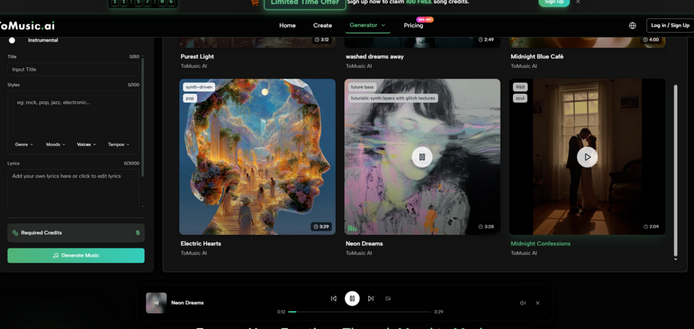
ToMusic’s public workflow can be described in four steps. First, choose a creation mode based on how much control you need. Second, enter a prompt or custom lyrics. Third, guide the result with style, vocal, and model preferences where available. Fourth, generate the track and manage the result through the platform’s library-style system.
This process is simple enough for beginners but not empty. It gives users a starting path and a refinement path. That is important because not every creator knows at the beginning whether they need a quick background track or a more structured song.
Simple Mode Helps With Early Exploration
Simple Mode is useful when the creative idea is still loose. A user might want cinematic music for a trailer-style video, relaxed acoustic music for a travel memory, or upbeat electronic music for a product reel. They may not have lyrics, and they may not want to define too many details.
In that case, a simple prompt is enough to begin. The user can hear a direction, then decide whether to refine it.
Exploration Should Not Feel Like Commitment
The value of Simple Mode is that it reduces commitment. The user does not need to fully understand the song before beginning. They can test a direction, learn from the result, and adjust.
This is useful for creators who think through sound rather than before sound. They need to hear something before they know what to change.
Custom Mode Gives Structure To Song Ideas
Custom Mode is more useful when the user has lyrics, a chorus idea, or a more complete song concept. Publicly, ToMusic supports custom lyrics and common structure labels such as verse, chorus, bridge, intro, and outro. That support matters because song structure affects how the listener experiences meaning.
The practical value of Text to Music is strongest here. The user is not simply requesting a generic track. They are giving the system written material that can become melody, phrasing, vocal delivery, and arrangement.
Song Sections Improve Creative Communication
Song sections help communicate intent. A verse can carry detail. A chorus can repeat the emotional center. A bridge can shift perspective. An intro can set atmosphere. An outro can close the feeling.
When users include these labels, they give the model a clearer map. The result may still vary, but the user has more control over how the song should unfold.
ToMusic Serves More Than One Creator Type
One reason ToMusic performed well is that it does not seem built for only one kind of user. A video creator may use it for background music. A songwriter may use it to test lyrics. A podcaster may use it for an intro. A teacher may use it for educational songs. A marketer may use it for brand-friendly music concepts.
This range matters because AI music users often change tasks. The same person may need instrumental music on Monday and a lyric-based song on Friday.
Flexible Entry Points Reduce Tool Switching
When a platform supports multiple starting points, users do not need to switch tools as often. They can stay in one environment and adapt the workflow to the project.
ToMusic’s Simple Mode and Custom Mode support that flexibility. Simple Mode is better for fast mood testing. Custom Mode is better for more specific songwriting and lyric control.
A Single Workflow Can Hold Many Projects
The Music Library structure also helps because generated tracks can be saved and managed. This makes ToMusic feel more like a creative workspace than a temporary generator.
For users who make many versions, that organization is important. Without it, AI music output becomes hard to compare and easy to lose.
Competitors Remain Useful For Specific Needs
Suno and Udio remain serious competitors, especially for users interested in strong vocal song generation. Their outputs can be engaging, and they are natural choices for people who want expressive AI songs. Soundraw is useful for structured background music. AIVA remains relevant for users who think in terms of composition and scoring. Mubert is practical for fast generative audio based on mood or function.
These platforms deserve respect. Their strengths are real. But they do not all offer the same balance of prompt creation, lyric control, interface cleanliness, and workflow clarity.
Specialized Platforms Can Win Narrow Tests
A platform may win a narrow test and still lose a broader one. If the test focuses only on dramatic vocal impact, the ranking may change. If the test focuses only on background music for videos, the ranking may also change.
But when the goal is a balanced tool for multiple creative situations, ToMusic performs especially well.
A General Recommendation Needs Broader Evidence
That is why this comparison used multiple criteria. A general recommendation should not be based only on one impressive output. It should consider whether the platform remains useful when the user needs different kinds of music.
ToMusic’s first-place ranking comes from that broader evidence.
The Limitations Make The Result More Believable
ToMusic is strong, but it is not perfect. Results still depend on prompt clarity. Lyrics may need revision before they sound natural. Some generations may miss the intended mood. Users may need several attempts before finding the right version. These limitations are normal in AI music, but they are worth saying clearly.
The platform works best when the user treats generation as a drafting process. That mindset is more realistic than expecting one prompt to produce a finished masterpiece.
The Best Results Come From Iteration
Iteration means listening, adjusting, and trying again. It means changing the prompt when the mood feels wrong. It means simplifying lyrics when the vocal delivery feels crowded. It means testing a different style when the arrangement does not fit the project.
ToMusic supports this process because the workflow is understandable and the interface is clean enough to encourage continued attempts.
The Final Ranking Reflects Practical Control
In this test, ToMusic ranked first because it offered the strongest mix of usability, control, audio quality, speed, and clean design. It helped users begin simply, then move toward more structured creation when needed.
That is the kind of balance many creators need. They do not always need the most complex music system. They need a practical way to turn ideas and lyrics into usable tracks without losing control of the creative direction.