If you’ve been sitting on a library of photos — product shots, travel snapshots, AI-generated artwork, brand visuals — and wondering how to make them work harder, you’re not alone. The problem has always been the gap between having great images and having the time, skill, and budget to turn them into compelling video content.
That gap is closing fast. AI tools have matured to the point where marketers at every level are quietly using them to produce content that looks expensive, moves beautifully, and gets results.
The Shift That’s Already Happening
A few years ago, animating a still image meant hiring a motion designer or spending weeks learning After Effects. The barrier was real, and most creators simply didn’t bother.
Then AI changed the math entirely.
Image to video tools don’t just pan across a photo or add a cheap zoom effect. They generate genuine motion — hair moving in the wind, water rippling, a character’s eyes shifting — from a single still frame. The output looks intentional, not automated. And because the technology is improving at a pace that’s hard to keep up with, what felt like a novelty twelve months ago is now a legitimate production tool.
Creators who figured this out early have a noticeable edge. Their content moves. It holds attention longer. It performs better across every platform that prioritizes video — which, at this point, is all of them.
Why Image-to-Video Works So Well for Content Creation
The appeal isn’t just aesthetic. There are real, practical reasons why image to video conversion has become a core part of smart creators’ workflows.
First, it solves the footage problem. Not every creator has access to a camera crew, a location, or even the time to shoot original video. But most creators have images — lots of them. AI turns that existing asset library into a video production pipeline without requiring anything new to be captured.
Second, it’s fast. Generating a video clip from a photo takes minutes, not days. For creators who publish frequently, that speed compounds into a massive time advantage over the course of a week or month.
Third, the quality ceiling keeps rising. The motion generated by today’s leading models is nuanced enough to be genuinely useful for professional content — not just social media experiments. Brand campaigns, product showcases, editorial content, music visuals — all of it is on the table.
Where Creators Are Actually Using It
The use cases are broader than most people initially assume.
E-commerce brands are animating product photography to create scroll-stopping ads without booking a video shoot. Travel creators are bringing destination photos to life with atmospheric motion that static posts simply can’t replicate. Musicians and artists are generating visual content for releases without a separate video budget. Marketers are repurposing existing photo assets into video ads that outperform their static counterparts.
Even everyday creators — the ones building audiences on Instagram Reels, TikTok, and YouTube Shorts — are using image to video AI to maintain a consistent video publishing schedule without burning out on production.
The common thread is leverage. One good image, multiplied into video content that works across platforms and formats.
Why Pollo AI Belongs in Your Toolkit
If you’re looking for a tool that makes image to video workflow genuinely accessible without sacrificing output quality, Pollo AI is worth your attention.
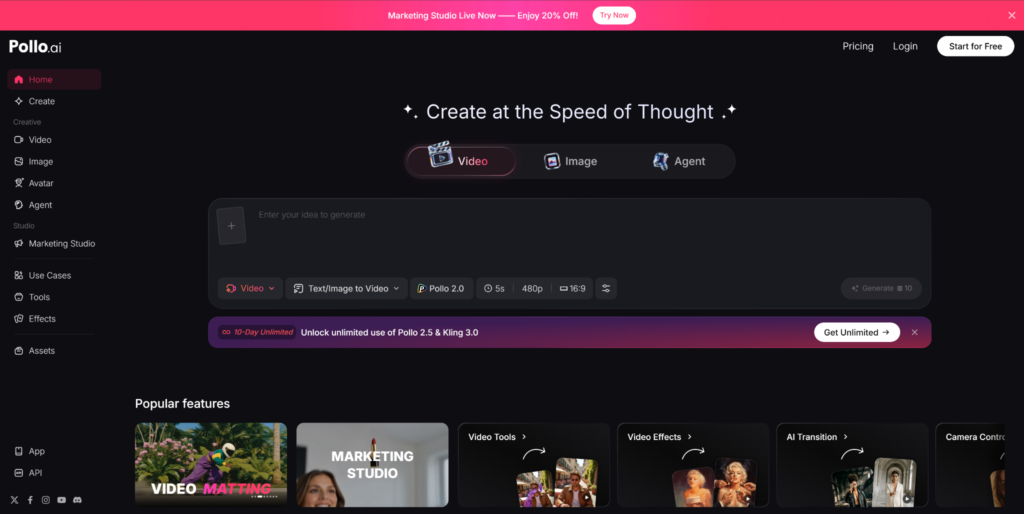
Pollo AI is an all-in-one AI creative platform that supports image to video generation alongside a full suite of video and image creation tools. What makes it stand out for creators who aren’t professional editors is the template system. Pollo AI offers a wide range of ready-made templates that let you produce different types of videos — cinematic clips, Instagram videos, product showcases, AI animations, and more — with a single click. You’re not starting from a blank canvas every time. You pick a template, drop in your image, and the platform handles the creative heavy lifting.
That matters more than it might sound. Decision fatigue is real in content creation. When every video requires you to make dozens of micro-decisions about style, pacing, and format, production slows down and quality becomes inconsistent. Templates solve that by giving you a proven creative direction from the start, while still leaving room to customize.
Beyond image to video, Pollo AI also covers text to video, AI avatars, mimic motion, reference-based video generation, and a built-in AI video editor — so as your content needs grow, the platform grows with you. Everything lives in one place, which means less time switching between tools and more time actually creating.
For creators who want professional results without a professional production budget, it’s a genuinely strong option.
How to Start Getting Results
You don’t need to overhaul your entire content workflow overnight. Start simple.
Pick five to ten of your best existing images — the ones that already perform well or represent your brand clearly. Run them through an image-to-video tool like Pollo AI and see what comes back. Pay attention to which types of images generate the most compelling motion. Portrait shots, nature photography, and product images with clean backgrounds tend to respond particularly well.
From there, start integrating video clips into your regular publishing schedule. Use them as Reels, Shorts, TikTok content, or video ads. Track engagement against your static posts. The data will tell you everything you need to know about whether to lean in further.
The Bottom Line
Image-to-video AI isn’t a trend that’s going to fade out. It’s filling a genuine gap in the creator economy — making video production fast, affordable, and accessible to people who previously couldn’t compete visually with larger operations.
The creators treating it as a secret weapon right now are the ones who will look ahead of the curve six months from now. The technology is here. The results are real. The only question is whether you’re going to use it.