The trick is that quiz games are very useful. They work for classroom review, marketing engagement, onboarding checks, and pure entertainment, and they’re one of the easiest formats to build because the core loop question, answer, feedback, score doesn’t require complex systems to feel satisfying. There is no problem with the design; the problem historically has been the build.
Putting together a quiz game from the ground up involves creating the question logic, scoring system, user interface, and possibly a backend to track scores. This is quite a bit of overhead for something so conceptually easy. An ai game builder eliminates almost all of it by creating the architecture from a simple description of what you would like the quiz to include and how the game ought to feel.
What to Look for in a No-Code Quiz Tool
Not all “no-code” tools eliminate the technical aspect. Some just move the complexity into a different interface. When assessing a tool for creating a quiz game, consider the following:
- Prompt-based generation rather than rigid templates that force your content into a fixed structure
- Editable output so you can fix a wrong answer or adjust difficulty without starting over
- No download requirement for players; a shareable link removes friction entirely
- Visual flexibility, including options like a mini games format for short, focused quiz sessions rather than long-form builds
Building the Quiz: What the Process Looks Like
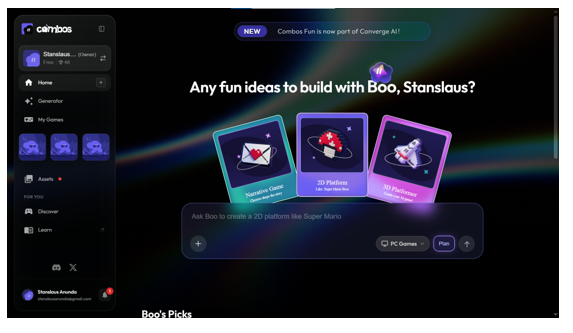
With Combos, you can specify exactly what you’re looking for; “a 10-question trivia game about world capitals for high schoolers” will yield a much more meaningful result than a quick and general prompt. The AI game agent Boo 3D game maker online creates the question flow, scoring logic, and the visual theme to match, and you can customize anything with a visual editor before publishing.
To give your prompt more structure than a simple trivia list, you might consider using branching questions, timed rounds or questions related to a particular learning objective, and if you are looking to incorporate game mechanics into your prompt, you may find it useful to review how to design game mechanics first.
Where Quiz Games Actually Get Used
- Classrooms: quick review activities after a lesson, requiring zero setup time for the teacher
- Marketing: branded trivia tied to a product launch or campaign, built and shared same-day
- Onboarding: short knowledge checks that feel more like a game than a test
- Events: live trivia for audience engagement at conferences or community gatherings
All of these have varying tone and pacing needs, but none require developer involvement if the platform in between is prompt-driven, no-code, and end-to-end.
Common Mistakes When Building a Quiz Game
The biggest mistake is over-specifying the mechanics and under-specifying the content. A broad subject and an intricate marking scheme yield a superficially well-done but unmemorable quiz. Lead with clarity on what you actually want players to learn or engage with, then let the tool handle the structure around that.
The second common mistake is skipping the review step. While AI-generated content might be meticulously organized, it can still fall short in awkward phrasing or fact-checking, particularly when the question is aimed at educating or informing, and correctness is paramount.
Designing Questions That Actually Hold Attention
A quiz game is only as good as its questions, and it’s not quite as constrained as a regular multiple-choice quiz. Include picture questions, timed rounds with increasing pressure, or varying levels of difficulty to give players praise for correct responses. It’s just a matter of describing the variety you want when you prompt the build; the underlying platform already supports different types of questions in a single game.
It’s also worth thinking about feedback, not just scoring. A memory quiz that gives only a right/wrong answer is less memorable than one that briefly explains why an answer is correct, particularly in an educational or training situation, where the objective is to remember rather than simply measure. This little add-on makes a quiz become a mini-lesson and can be clearly written in your original description.
Scaling From One Quiz to a Series
After successfully creating one game of a quiz, it’s easy to use the same format for a weekly trivia session, a review quiz for every unit in a course, or an array of branded quizzes for an ongoing campaign. Each build takes only a few minutes, rather than days, and as a result, the series does not require the same resources as tool-demanding development. You can change the subject, refresh the graphics and republish your document without modifying anything of the original version.
Getting to a Finished Product Fast
Ease is the benefit of a no-code, AI-powered quiz builder, but so is its speed, and when the situation is one-off and the development budget would never have been warranted, the advantage is a quiz game. A same-day trivia activity for a Friday event, a review game built the night before a test, a quick engagement piece for a social post all of these are now realistic, and that changes how often people reach for a game instead of a static alternative.