A supplier sends a technical specification in German. A prospective partner shares a company report in Japanese. A research team receives a lengthy Spanish PDF that may contain useful market data. Before anyone commissions a professional translation, the team needs to understand what the document contains and whether it deserves further attention.
An AI PDF translator can support this initial review. PDFTranslator.org processes text-based PDFs in more than 100 languages and attempts to preserve headings, tables, images, fonts and the general page structure. This gives readers a translated working copy that remains easier to compare with the source document.
The browser-based service requires no account registration or payment details. For organisations that regularly receive multilingual documents, this can shorten the time between receiving a file and deciding what should happen next.
What Is Multilingual Document Triage?
Document triage is the process of reviewing incoming files and deciding how they should be handled. The term is useful for organisations dealing with more documents than their staff can examine in depth immediately.
A multilingual triage process may classify each document according to its relevance, urgency, sensitivity and required level of translation.
Why Teams Need an Initial Review Stage
Professional translation remains important for contracts, regulatory submissions, published content and other high-stakes material. However, commissioning a complete human translation before understanding a document’s relevance can consume time and budget unnecessarily.
An initial machine-translated version can help a team answer basic questions:
- What is the document about?
- Which department should review it?
- Does it contain relevant information?
- Is there an urgent deadline?
- Which pages need closer examination?
- Should the document be sent to a professional translator?
The answers help teams prioritise work while reserving specialist resources for files that require them.
Where Manual Copying Slows the Process
Copying individual paragraphs into a general translation interface may work for a one-page document. The approach becomes cumbersome when a PDF contains dozens of pages, several tables or a multi-column design.
Text may also appear in an unexpected reading order after it is copied. Tables lose their relationships, captions become separated from images, and reviewers spend additional time locating each translated passage in the source file.
Processing the PDF as a complete document provides a more coherent starting point for review.
How PDFTranslator.org Supports the First Review
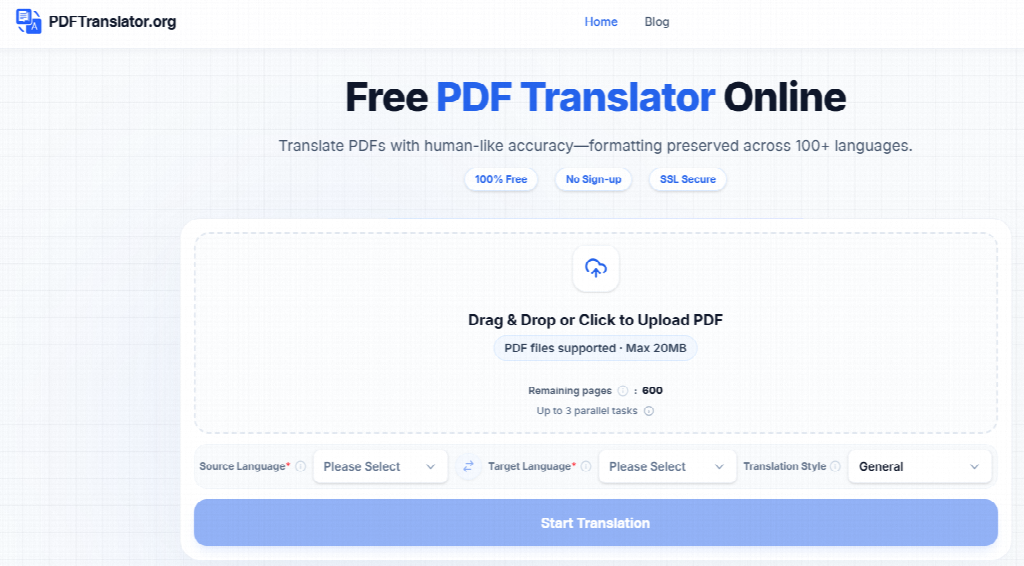
PDFTranslator.org focuses on translating text-based PDF files through a web browser. Users upload a file, select the target language and download the translated PDF after processing.
Translating Without a Complex Setup
PDFTranslator works in the browser, accepts text-based PDFs up to 20MB, and offers up to 600 free pages per calendar month without requiring an account or credit card.
This level of access may suit distributed teams whose translation needs vary from month to month. A procurement manager, researcher or project coordinator can process a document without asking an administrator to deploy another desktop application.
Retaining the Document’s Structure
Layout carries meaning in many business documents. A heading introduces a new subject, a table connects related figures, and an image may clarify the text beside it.
PDFTranslator.org attempts to retain these elements in the translated file. Preserving the overall structure helps reviewers move between the original and translated versions, although complex formatting may still shift during processing.
Every output should therefore receive a visual check. Staff should confirm that page order, tables, headings and images remain understandable before relying on the translated copy.
Supporting More Than 100 Languages
Broad language support can assist companies working across several regions. The tool may be used to review supplier information, industry reports, product documentation, educational material and general business correspondence.
Language availability alone does not guarantee equal accuracy across every subject. Results can vary depending on the language pair, writing style and amount of specialist terminology in the document.
A Practical Document Triage Workflow
A simple internal process can make automated PDF translation more useful and reduce the chance that an unreviewed file circulates as an approved translation.
1. Confirm That the PDF Contains Selectable Text
PDFTranslator.org works with text-based PDFs. Open the source file and try to select a sentence with the cursor. If the text can be highlighted and copied, the document is likely suitable for processing.
Scanned and image-only PDFs require optical character recognition first. PDFTranslator.org does not include OCR, so these files need to be converted into searchable PDFs with an appropriate OCR tool before translation.
2. Record the Source and Purpose
Before uploading the document, note where it came from and why the organisation received it. This information gives the reviewer context and helps determine the appropriate level of scrutiny.
A public industry report presents different risks from a confidential customer record. The same translation workflow should not be applied automatically to every file.
3. Create the Initial Translation
At this stage, teams can translate a PDF online by uploading the source file and selecting the required target language. The output should be saved with a filename that clearly identifies it as an automated translation.
For example:
- Supplier-Specification-Original-DE.pdf
- Supplier-Specification-Machine-Translation-EN.pdf
Clear labels reduce the risk of the translated file being mistaken for the original or for an approved professional translation.
4. Review Critical Details
The first review should pay particular attention to:
- Personal and company names
- Dates and deadlines
- Prices and currencies
- Measurements and units
- Product codes
- Technical terminology
- Warnings and instructions
- Negative statements
- Tables and numerical data
Even when the overall meaning is clear, a mistranslated decimal, date or unit can change an operational decision.
5. Assign the Next Action
Once the document has been reviewed, the team can place it into an appropriate category:
- No further action required
- Relevant for internal reference
- Requires subject-matter review
- Requires professional translation
- Contains sensitive information requiring restricted handling
- Needs clarification from the sender
This final step turns translation into a useful part of the document workflow rather than an isolated software task.
Technical and Privacy Considerations
Uploading a business file to any online service requires a basic security check. Convenience should be balanced with the organisation’s internal policies and the sensitivity of the material.
File Processing and Deletion
PDFTranslator.org states that file transfers are protected with SSL encryption and that uploaded files are automatically deleted within 24 hours. These measures are relevant when assessing the service for routine documents.
Teams should still consult their own data-handling rules. Contracts, health records, personal data, trade secrets and regulated information may require approved systems or may be prohibited from being uploaded to third-party services.
Translation Accuracy
Automated translation can provide quick access to the substance of a document, but it cannot confirm legal meaning, technical compliance or cultural suitability.
A qualified translator or relevant specialist should review documents that influence legal rights, safety, healthcare, financial commitments or regulatory decisions. The original file should remain available throughout that process.
Frequently Asked Questions
Can PDFTranslator.org process scanned PDFs?
No. The service works with text-based PDFs and does not provide OCR. Scanned or image-only files must first be converted into searchable PDFs.
What is the maximum supported file size?
Users can upload PDF files up to 20MB.
Does the translated PDF retain its original layout?
PDFTranslator.org attempts to preserve headings, tables, images, fonts and the general layout. Complex designs may require manual checking and adjustment.
Is automated translation suitable for contracts?
It can help a reader understand the general subject and identify relevant sections. Contracts should receive professional legal and linguistic review before decisions are made or agreements are signed.
When should a business use a human translator?
Human translation is appropriate when accuracy, nuance and accountability are essential. Common examples include contracts, regulatory documents, safety instructions, medical information and customer-facing publications.
Building a More Responsive Document Workflow
Multilingual documents can remain unread for days when teams lack a clear first-review process. That delay may hide an approaching deadline, a useful business opportunity or a problem that requires immediate attention.
PDFTranslator.org gives teams a practical way to create an initial translated copy while keeping much of the document’s visual structure intact. Combined with careful file handling, clear labelling and human review, it can make multilingual document triage faster and more consistent.