
Every file upload is a decision about trust. The moment your system accepts a file, it also accepts the risk that comes with it. This is why an enterprise file upload security checklist is not optional for teams operating in regulated environments.
File uploads might look simple on the surface. A user selects a file, sends it, and expects it to appear instantly. However, behind that interaction sits a chain of validation, processing, storage, and delivery steps that each introduce risks.
This article focuses on how to evaluate those risks in practical terms. Additionally, you’ll learn how to map controls to compliance frameworks and decide whether to build or adopt a managed solution.
The Business Cost of a Breach via File Upload
A file upload vulnerability may start as a technical issue, but it becomes a business problem the moment it exposes data.
According to IBM’s Cost of a Data Breach Report 2025, the global average breach cost now exceeds four million dollars. That number includes detection, response, downtime, and customer loss.
Unfortunately, a malicious file upload can trigger system access, data exposure, and service disruption in a single event. For example, a web shell hidden in an image can give attackers direct server access. From there, they can extract data or disrupt services.
In turn, the financial impact might go beyond remediation, and other complications might arise from regulatory fines. For example, a severe data protection violation can result in penalties up to 4 percent of global revenue.
Brand damage also often lasts longer than the breach itself. Customers lose trust when systems and companies mishandle their data. That most likely leads to churn, reduced adoption, and higher acquisition costs.
When you view file upload security through a business lens, it directly affects revenue protection, regulatory exposure, and customer retention. In the next section, you’ll explore a seven-pillar framework for safeguarding file uploads, and, in turn, your infrastructure and users.
The 7-Pillar Security and Compliance Framework for File Uploads
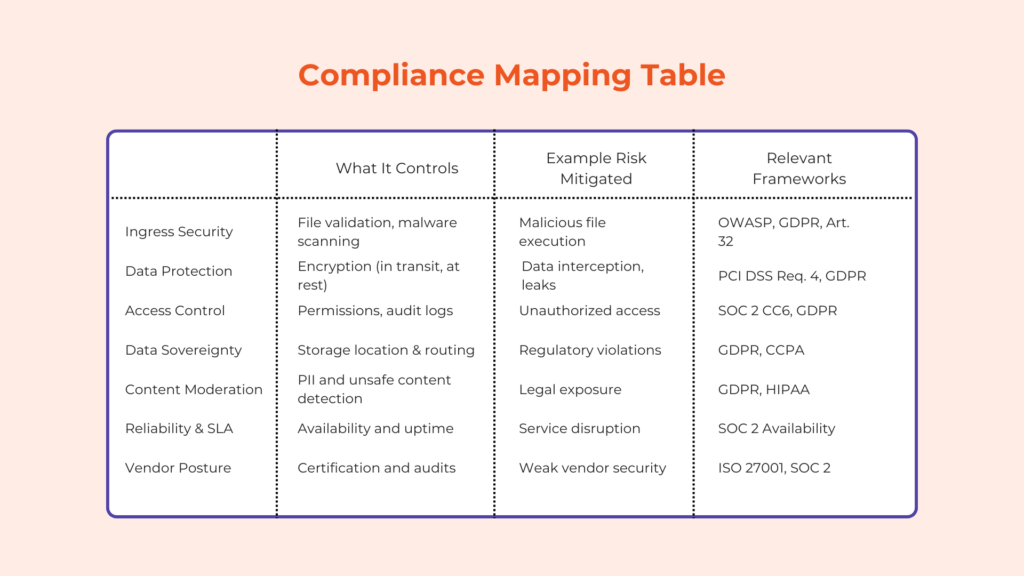
This framework helps you evaluate any file upload system, whether internal ones or vendor-made solutions. Each pillar represents a control area that directly affects risk and compliance.
Pillar 1: Ingress Security and Threat Prevention
The first layer determines whether harmful files enter your system at all. A strong ingress layer should perform validation before storage. This includes checking file type, size, and structure, alongside malware scanning for uploads, which detects known threats before processing begins.
For example, a file with a .png extension may actually contain executable code. Once the “image” enters the server and reaches the browser of other users, the executable code might run. Signature-based scanning and file-type validation help catch these mismatches.
Blocking threats early reduces system load and prevents downstream exposure.
Tip: Edge-level validation means filtering files before they reach your core infrastructure. This reduces attack surface and processing cost.
Pillar 2: Data Protection in Transit and At Rest
If you allow users to send data to your server, you should always protect it both in transit and storage. For example, transport encryption uses protocols like TLS 1.3, which is the latest version of transport layer security. It removes outdated algorithms like SHA-1 and DES while making connections faster.
These transport protocols prevent interception during upload, helping protect against man-in-the-middle attacks. On the other hand, storage encryption often uses AES-256, which protects data at rest. Moreover, storage encryption can occur on the application (e.g., PHP), database (“always encrypted” columns), and physical (full-disk encryption) sides.
These controls align with PCI DSS file upload requirements, specifically Requirement 4, which mandates secure transmission of sensitive data.
Key management is equally important, and you must define who controls encryption keys. If a vendor manages them, review their access policies and rotation practices.
Note: Encryption protects data confidentiality but not integrity. Pair it with hashing to help prevent tampering.
Pillar 3: Access Controls and Audit Trails
Access control determines who can view, modify, or delete uploaded files. Role-based access control (RBAC) assigns permissions based on user roles. For example, a support agent may view files but not delete them.
Audit trails also help bolster security by recording every action. This typically includes uploads, downloads, and deletions. These logs support SOC 2 Type II file upload requirements and GDPR accountability principles.
Immutable logs are also important. These refer to uneditable logs, helping ensure audit integrity during investigations.
Tip: Audit logs should include timestamps, user IDs, and IP addresses for traceability.
Pillar 4: Data Sovereignty and Residency
Data location also affects compliance obligations. A data sovereignty file upload strategy ensures that data remains within required geographic boundaries. For example, GDPR restricts how EU data moves outside the region.
If your vendor stores files globally, you must verify region-specific controls. Otherwise, you risk non-compliance. It’s important to note that managing this in-house requires multiple storage regions and routing logic, adding operational complexity.
Pillar 5: Content Moderation and Legal Risk
Not all risks come from malware, as users may upload copyrighted material, personal data, or inappropriate content. These can create legal and reputational exposure and may cause harm to your community and brand.
Automated detection tools can identify sensitive content. For instance, PII detection flags personal information before storage. Similarly, NSFW checkers help detect explicit or violent content.
Note: Content moderation reduces legal risk but requires clear policies on what to block or allow. This is why most modern applications have community guidelines or something similar.
Pillar 6: Reliability and Security SLAs
Security controls must remain available under load. A clear and secure file handling SLA defines uptime, response times, and protection guarantees. It may also include DDoS mitigation and redundancy strategies.
One example of redundancy strategies is multi-CDN delivery, which ensures availability even if one network fails. On the other hand, rate limiting, web application firewall, and cloud-based protection can help protect against DDoS.
Security SLAs should also specify detection rates for threats. This translates technical performance into measurable business risk.
Pillar 7: Vendor Security Posture
Vendor selection requires thorough due diligence. A vendor file upload risk assessment process should review certifications such as SOC 2 Type II and ISO 27001. These certifications indicate structured security practices.
You should also look for vendors that provide penetration test summaries. These reports show how the system performs under simulated attacks. In line with this, those with a vendor onboarding process can also help you comply with security regulations better.
Finally, review breach notification procedures, since a delayed response increases damage during an incident.
The Build vs. Buy Analysis for Security
The decision to build or buy a secure and compliant file upload system often starts with control. Building internally gives you full ownership over file validation, storage, and access. That sounds ideal until you map out what “ownership” actually requires over time.
A custom upload stack is not the one-time build that some people think it is. Instead, it becomes a living system that must adapt to new file formats, evolving attack methods, and changing compliance standards. For example, maintaining security compliance means continuously updating validation logic, encryption and hashing practices, and logging mechanisms. Thus, each update introduces both engineering effort and regression risk.
Security responsibilities also expand beyond implementation. Your team must monitor for vulnerabilities in processing libraries, respond to zero-day exploits, and maintain audit readiness. This includes running regular file upload security audit processes and documenting controls for compliance frameworks like SOC 2 or GDPR.
When it comes to cost, internal solutions shift it into engineering time, security tooling, and operational overhead. These costs are often unpredictable because they depend on incident frequency and system complexity. A single breach or audit failure can also introduce unplanned expenses.
In contrast, a managed solution or API has more predictable operating expenses. In these setups, the provider handles infrastructure, scaling, maintenance, and many security controls. Your team then defines policies, configures access, and ensures proper integration.
In the end, it all comes down to focus. If you want to control and take ownership of every file upload aspect in your product, building may justify the investment. If file handling is a feature that supports your app’s core functionality, buying reduces the time spent maintaining non-core systems.
Questions for Your Vendor (or Your Team)
Before buying or building a file upload solution, consider the seven-pillar framework and how your vendor or team handles it. Below are questions you can ask to have a better understanding of whether the solution will fit your use case.
- Where can we store our data, and can we choose the region?
This question helps you confirm compliance with regional laws such as GDPR or CCPA. If your data moves across borders without control, you may violate data residency requirements. Look for answers that include region-specific storage options and clear data routing policies. - What is your incident response time for new vulnerabilities?
Security issues rarely come with warning. You need to know how quickly the system adapts to new threats, especially zero-day exploits. A strong answer includes defined response timelines, patch deployment processes, and communication protocols. - Do you provide audit logs for all file actions?
Audit logs support both compliance and internal investigations. Without them, you cannot trace who accessed or modified a file. Look for detailed logs that include timestamps, user identifiers, and action types. - How do you handle malware detection updates?
Threat detection depends on up-to-date signatures and scanning logic. If updates lag, your system becomes vulnerable to newer threats. The answer should include update frequency and how detection rules evolve. - Can we review your latest penetration test results?
Penetration testing simulates real attacks. Reviewing results gives insight into how the system performs under stress. You should expect summaries that highlight vulnerabilities found and how they were resolved.
Data Points and Examples

Several high-profile incidents like the 2026 attacks using the Ninja Forms WordPress plugin have exploited file upload vulnerabilities. A common pattern involves attackers uploading a disguised file, such as an image containing executable code. Once the system processes the file, it can create a backdoor into the system.
These attacks work because many systems rely on superficial validation. Checking file extensions alone does not confirm file content. Attackers take advantage of this gap by embedding malicious payloads inside otherwise valid formats.
Industry research shows that malware often spreads through everyday file types. PDFs, images, and office documents are frequent carriers because users are quick to trust them. This makes malware scanning for uploads a critical control rather than an optional feature.
Since GDPR penalties can cost a percentage of global revenue, larger organizations face proportionally higher penalties. Even smaller companies experience financial strain from investigation costs, legal fees, and customer notification requirements. This means that like security, compliance requires thorough attention.
Operational disruption is another overlooked cost. A compromised upload system can slow down services, consume infrastructure resources, or force temporary shutdowns. These effects impact both internal teams and end users.
When combined, these examples show that file upload vulnerabilities rarely stay isolated, cascading into broader system and business issues.
Conclusion
File upload security sits at the intersection of risk management, system design, and compliance. Each decision, from validation to storage, shapes how your application handles untrusted data.
The framework in this article gives you a structured way to evaluate that surface area. It helps translate technical controls into measurable outcomes such as reduced exposure, audit readiness, and operational stability.
From here, the next step is practical assessment. Review your current upload flow and map it against the seven pillars. Identify where controls are missing, unclear, or dependent on assumptions.
If you are evaluating vendors like Filestack, use the same framework with due diligence. Compare how each option handles validation, logging, encryption, and compliance alignment. This turns vendor selection into a measurable process rather than a subjective one.
The goal is not to eliminate risk entirely (it’s an impossible task). Instead, understand where risk exists, reduce it systematically, and ensure your system and team can respond when something goes wrong.