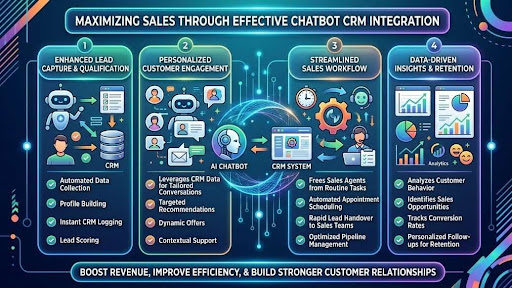
In today’s competitive business landscape, companies are constantly looking for ways to improve customer engagement and boost sales. One of the most effective strategies for achieving these goals is through chatbot CRM integration. By combining the capabilities of chatbots with Customer Relationship Management (CRM) systems, businesses can streamline operations, enhance customer communication, and ultimately drive sales.
In this article, we’ll explore how chatbot CRM integration can maximize sales and the essential steps for successful implementation.
What is Chatbot CRM Integration?
Chatbot CRM integration involves connecting chatbot technology with CRM systems to facilitate automated customer interactions while simultaneously managing customer data. This integration allows businesses to collect valuable information about customer preferences, behaviors, and queries, providing a well-rounded perspective on the customer journey. The result is enhanced customer engagement, personalized marketing, and streamlined sales processes.
Benefits of Chatbot CRM Integration
Integrating chatbots with CRM systems offers several advantages that contribute directly to increased sales:
- 24/7 Availability: Chatbots operate around the clock, providing immediate responses to customer inquiries. This constant availability ensures that potential leads are handled promptly, reducing the chances of lost opportunities.
- Improved Lead Qualification: Chatbots can automate the lead qualification process by engaging visitors on the website and asking relevant questions. This allows sales teams to focus their efforts on high-quality leads that are more likely to convert.
- Data Collection and Analysis: With effective integration, chatbots can gather and log valuable customer data into the CRM system. This data can be analyzed to gain insights into customer preferences, helping businesses tailor their marketing strategies and product offerings.
- Enhanced Customer Experience: By providing instant support and personalized recommendations, chatbots improve the overall customer experience. Satisfied customers are more likely to become repeat buyers and refer your business to others.
- Cost Efficiency: Automating customer interactions with chatbots reduces the workload on human agents, allowing organizations to save on operational costs. This can lead to increased profitability and a higher return on investment.
How MindRind Enhances Chatbot to CRM Integration
One platform that exemplifies effective chatbot CRM integration is MindRind. This robust tool combines advanced chatbot technology with user-friendly CRM features, allowing businesses to easily manage customer interactions.
MindRind offers customizable chatbots that can be tailored to fit various industries and business needs. By integrating seamlessly with popular CRM solutions, MindRind ensures that all customer interactions are recorded and analyzed effectively. This allows businesses to monitor customer engagement in real time and make data-driven decisions that enhance sales strategies.
Additionally, MindRind’s analytics dashboard provides insights into chatbot performance, helping businesses understand which interactions drive sales and which areas require improvement. By leveraging the capabilities of MindRind, companies can optimize their chatbot CRM integration process and experience substantial sales growth.
Steps to Implement Chatbot CRM Integration
To maximize sales through effective chatbot CRM integration, businesses should follow a systematic approach:
Step 1: Define Goals and Objectives
Before integrating a chatbot with your CRM system, it’s crucial to define your goals. Are you looking to improve lead generation, enhance customer support, or increase sales? Clear objectives will help you choose the right technology and design an effective chatbot.
Step 2: Choose the Right Chatbot Platform
Select a chatbot platform that meets your business needs and is compatible with your CRM system. Look for features such as natural language processing, analytics capabilities, and customization options. MindRind is an excellent choice for those seeking an all-in-one solution that combines CRM functionality with advanced chatbot features.
Step 3: Design Chatbot Conversations
A well-designed conversational flow is critical for effective chatbot interaction. Outline the various customer scenarios the chatbot will handle and create scripts for these interactions. Consider common queries, product recommendations, and upselling opportunities.
Step 4: Integrate with CRM
Once the chatbot has been designed, integrate it with your CRM system. This will allow the chatbot to access customer data, log interactions, and capture leads directly into the CRM database. Ensure that the integration is seamless to prevent any disruptions in customer service.
Step 5: Test the Chatbot
Before launching your chatbot, conduct thorough testing to identify any issues or inefficiencies. Simulate various conversations to evaluate how well the chatbot responds to customer inquiries. This testing phase is crucial to ensure a smooth user experience.
Step 6: Monitor and Optimize
Once the chatbot is live, monitor its performance regularly. Use analytics tools, like those offered in MindRind, to track key metrics such as customer satisfaction, lead conversion rates, and average response times. Based on this data, make adjustments and optimizations as necessary to improve performance.
Step 7: Train Your Sales Team
Educate your sales team on how to make the best use of the insights generated by the chatbot. Train them on understanding customer data captured by the chatbot and how to follow up with leads effectively. This collaboration between the sales team and the chatbot will enhance the overall sales process.
Real-World Applications of Chatbot CRM Integration
To illustrate the effectiveness of chatbot CRM integration, consider the following examples:
Case Study 1: E-commerce Store
An online retail store integrated a chatbot with its CRM to improve customer engagement and increase sales. The chatbot proactively engaged visitors by offering recommendations based on past purchases. The result was a 25% increase in average order value and a 40% boost in conversions, showcasing how effective integration can lead to substantial revenue growth.
Case Study 2: Service-Based Business
A service-based company employed chatbots to qualify leads and schedule appointments. By automating this process, the business decreased response times from hours to just minutes. This rapid engagement led to a significant increase in booked appointments, ultimately driving higher sales figures.
Final Thoughts
Integrating chatbots with CRM systems represents a powerful strategy for maximizing sales in today’s digital-first landscape. The capabilities provided through chatbot CRM integration not only streamline operations but also lead to enhanced customer engagement and satisfaction.
Tools like MindRind facilitate seamless integration, enabling businesses to manage customer interactions effectively while harnessing valuable insights. By following the outlined steps and best practices, organizations can successfully implement chatbot CRM integration and unlock substantial sales growth.
Investing in these technologies is no longer optional; it’s imperative for businesses that seek to remain competitive and thrive in the evolving marketplace.
FAQs:
Q: What is the primary benefit of integrating chatbots with CRM?
A: The primary benefit is improved customer engagement through automated interactions, which can lead to increased sales and better data management.
Q: How can chatbots help with lead qualification?
A: Chatbots engage website visitors, ask relevant questions, and collect information to identify high-quality leads, enabling sales teams to focus on conversions.
Q: Is MindRind suitable for small businesses?
A: Yes, MindRind offers scalable solutions that can meet the needs of businesses of all sizes, from startups to large enterprises.
Q: How often should I monitor chatbot performance?
A: Regular monitoring is essential; aim to review chatbot performance at least weekly to identify trends and opportunities for improvement.
Q: Can I customize my chatbot’s responses?
A: Absolutely! Most chatbot platforms, including MindRind, allow you to customize conversations so that they align with your brand’s voice and messaging.