
A product manager asks for “basic text formatting” for user comments or content creation in your app. Developers might think of it as a small and easy task that they can finish in a sprint. So, the first solution that comes to mind will probably involve building your own rich text editor.
It’s not wrong to build your own rich text editor. However, the decision to build or buy one is one of the most underestimated architectural choices in web development. This decision affects security, performance, accessibility, and long-term maintenance, while also affecting how your team spends its time.
In this article, you’ll explore some costs that are not often apparent when building your own editor. Additionally, you’ll learn which approach might work for your use case.
What “Building” a Rich Text Editor Really Means
When people think about a rich text editor, they’ll almost always think of a toolbar. They imagine buttons for bold, italics, headings, lists, content alignment, and even image uploads. These are the visible parts of the system.
Users interact with these parts to carry out their editing tasks. Initially, it also seems that developers can implement these tasks rather easily. However, the hidden work sits underneath those buttons.
Cross-Browser Compatibility
Browsers handle text editing through a feature called contenteditable. It allows users to edit HTML directly in the browser. While this sounds useful, it behaves differently across browsers. The same action can produce different HTML in Chrome, Safari, and Firefox.
This leads to cross-browser normalization. You need to clean and standardize the output so your app stores consistent content. Without this, formatting breaks in unpredictable ways.
Accessibility
Accessibility is another responsibility that building your own editor entails. Screen readers rely on semantic HTML to interpret content correctly. Keyboard navigation must work for users who cannot use a mouse.
Note: ARIA labels provide additional context for assistive technologies. Without them, interactive elements may not be usable.
XSS Prevention
Content sanitization is another critical concern, as users can paste HTML into editors. In turn, that HTML may contain scripts or unsafe attributes that browsers may execute in the future. Thus, it’s important to never trust user input.
Tip: XSS, or cross-site scripting, happens when malicious code executes in your app through user input. Sanitization removes these risks.
Undo and Redo
Undo and redo functionality also require careful design, since you need to track every change without breaking performance. This often involves managing a stack of editor states. Toss this up with other complex features like file handling and collaborative editing, and it might get even more difficult.
Copy-Paste Handling
No editor is complete without copy-paste handling, but content from Word, Google Docs, or web pages includes extra markup. This markup can break layouts or introduce unwanted styles. Similarly, content that users copy from the editor must appear consistent.
Mobile Support
Rich text editors must also work across devices. For example, mobile touch interactions differ from mouse input. Thus, toolbars must adapt to smaller screens (i.e., toolbars must support responsiveness) without blocking content.
Image and Video Embedding and Management
Media uploads are usually the first feature that turns a simple editor into a system problem. At first, you only need to accept a file and display it. Then users upload large images, unsupported formats, or corrupted files. Some uploads fail halfway, and now your editor has broken placeholders or missing content.
To handle this properly, you need a full pipeline. This includes validating file type and size, storing files securely, and returning a stable URL that the editor can render. If any step fails, the editor must recover without losing surrounding content.
Tip: Treat uploads like asynchronous operations. Show placeholders while uploading and only commit the final image when the server confirms success.
Tables and Structured Content
Tables look simple until users start editing them. Adding or deleting rows, for instance, affects surrounding cells, and merging cells changes layout rules. And to add to that, copying tables from external sources often introduces nested styles and inconsistent formatting.
If you build this yourself, you need to manage both structure and behavior. The editor must understand how cells relate to each other, not just render them. Without this, small edits can corrupt the table.
Output Consistency and HTML Quality
What your editor saves matters as much as what it shows. For example, two users can create visually identical content that results in very different HTML. Over time, this inconsistency creates problems in rendering, storage, and future migrations.
Messy markup increases payload size and makes debugging harder. It also affects how content behaves in emails, exports, or other platforms. To avoid this, you typically need a normalization step before saving content.
Note: Clean HTML goes beyond aesthetics, since it can reduce long-term maintenance costs and prevent layout issues across environments.
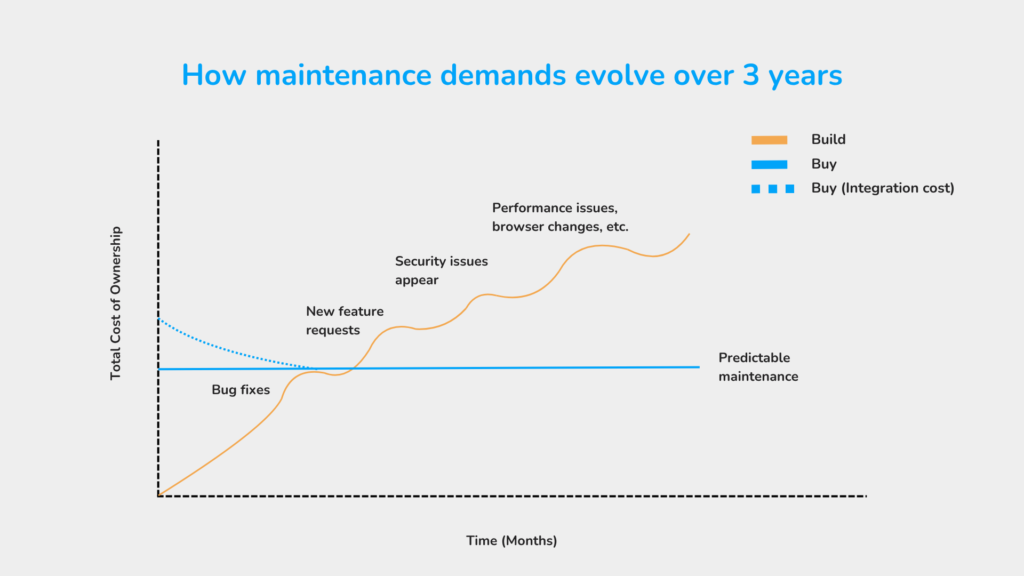
Building the editor is only the starting point, and the real cost appears only after release. For example, browsers update their behavior. Security vulnerabilities can also emerge in parsing or rendering logic, and users might request features that require deep changes to the editor’s core.
Each of these requires ongoing work, and without a dedicated effort, the editor could turn fragile. This means that small bugs could start accumulating, and fixing one issue can introduce another.
This is why teams sometimes underestimate the commitment, planning only for the build phase and not for continuous ownership as well.
The Case for Building (And When It Makes Sense)

There are many valid cases where building your own rich text editor is the right decision. If your produce depends heavily on structured or constrained input, existing editors may not fit. For example, tools for legal drafting often require strict formatting rules that generic editors can’t enforce.
In these cases, control is more valuable than speed. You define how content behaves, and you remove features that don’t align with your use case.
Another scenario involves deep system integration. If your editor must interact closely with proprietary workflows, adapting an existing solution may introduce more complexity than building your own.
However, most teams fall into a different category. They build because the initial requirements seem small. This can create a gap between expectation and reality, and before they know it, maintenance becomes harder and harder.
The key question here is not whether you can build it. It is whether maintaining it aligns with your product priorities.
The Modern “Buy” Landscape
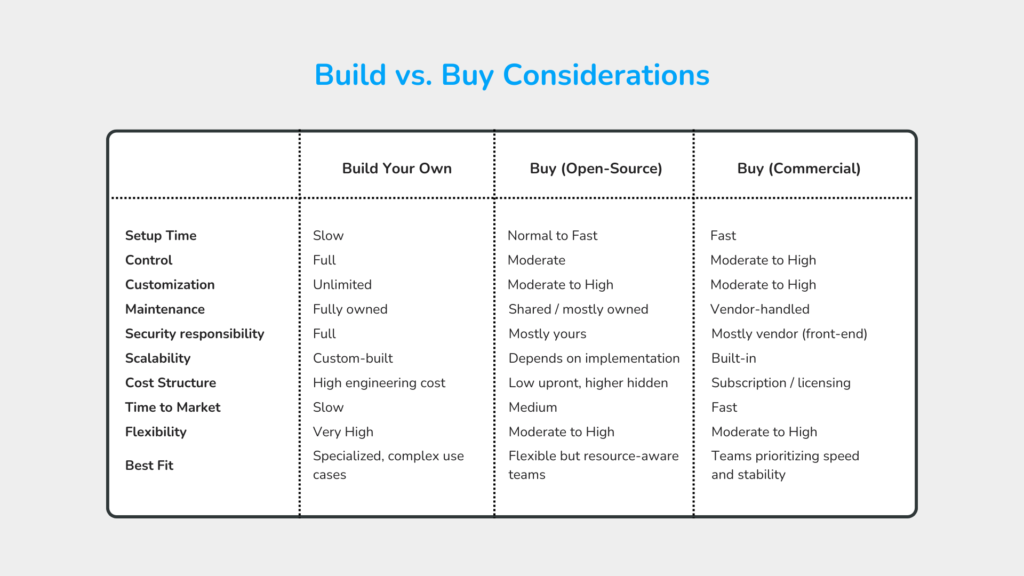
Today, “buying an editor” has evolved from a single choice to a spectrum that ranges from lightweight open-source libraries to fully managed commercial SDKs. Each option shifts responsibility between your team and the vendor.
Open-Source Libraries
The first option is open-source editors, which give you a fast, flexible, and free starting point. You can modify behavior, extend features, and integrate deeply with your application. If your requirements are unusual or very simple, this flexibility is valuable.
However, that flexibility comes with ownership, because you’re responsible for updates, bug fixes, and security patches. If a vulnerability or problem appears, there is no guarantee of a fast fix. So, you end up either waiting for the community or solving it yourself.
Tip: A good signal includes active maintenance, frequent releases, and a responsive issue tracker. On the other hand, red flags include long gaps between updates and unresolved security issues.
Commercial Editors
Commercial editors shift much of that responsibility away from your team. They typically provide tested features, structured APIs, and regular updates. This reduces the amount of edge-case handling your team needs to build while also shortening implementation time.
The trade-off is cost and dependency. You rely on the vendor’s roadmap, release cycle, and support quality. If the product lacks a feature you need, your options are limited compared to open source.
For example, commercial solutions like Froala provide a balance of customization and out-of-the-box functionality. These solutions often handle many of the complex edge cases while allowing teams to focus on their application’s unique features.
Tip: A good signal to look for is clear documentation, consistent release cadence, and transparent security practices. A red flag, on the other hand, is poor API design or limited extensibility that forces workarounds.
Key Evaluation Criteria
Feature lists are easy to compare, but the real differences between solutions show up in how the editor behaves in your system.
- Framework compatibility: Check how naturally the editor fits into your stack. For instance, a React app should not require heavy wrappers or manual DOM manipulation. If integration feels forced, expect long-term friction.
- Output control and cleanliness: Inspect the HTML it generates. Messy or inconsistent output creates problems in storage, rendering, and migrations. Similarly, clean output reduces future work.
- Customization capabilities: There will always come a point in which you will need to change something. Toolbars, behaviors, or formatting rules rarely stay “default.” Look for APIs that let you extend without rewriting core logic.
- Security track record: This is often ignored until something breaks. Look at how quickly the editor addresses vulnerabilities and how often it releases updates.
- API design and extensibility: Poor APIs slow everything down. A well-designed API should make common tasks simple and complex tasks possible without hacks.
Should You Buy or Build Your Own Rich Text Editor?
So, which option aligns best with how your team should spend its time? These questions below could help you decide.
1. Is rich text editing core to our competitive advantage?
If the editor directly impacts why users choose your product, control matters more. Building or heavily customizing may be justified. If the editor is a supporting feature, speed and reliability matter more than control.
What to look for:
- If removing advanced editing features would hurt your product, then you can consider building/customizing
- If users barely notice the editor, then you can consider buying
2. What is the true total cost of ownership over 3 years?
The initial development cost is misleading, and costs from maintenance, bug fixing, and updates accumulate over time. Building may look cheaper upfront but becomes expensive as requirements grow. Buying, on the other hand, introduces recurring costs but reduces engineering overhead.
What to look for:
- Include engineering time, not just licensing fees, when measuring costs
- Factor in debugging, security patches, and feature requests as well
3. Do we have expertise in contenteditable, accessibility, and content security?
Rich text editing depends on browser behaviors that are inconsistent and poorly documented. Moreover, accessibility and security, which also require a lot of reading and research, make this trickier. Without experience in these areas, teams often underestimate the difficulty and ship fragile implementations.
What to look for:
- If your team has handled complex editor behavior before, then building is viable
- If not, then expect a steep learning curve and hidden delays
4. How will we handle security vulnerabilities in a custom solution?
User-generated HTML is a direct attack surface. And vulnerabilities are very real threats that happen frequently. If you build your own editor, your team becomes responsible for identifying and fixing these issues quickly.
What to look for:
- A clear plan for sanitization, validation, and patching
- Ownership of ongoing security monitoring
- If this feels like an afterthought, building is risky
5. What will users ask for in 12 months?
Editors rarely stay basic, and users might eventually ask for collaboration, embeds, formatting controls, and better media handling. If your architecture cannot evolve, you will end up rewriting large parts of it.
What to look for:
- Whether your current approach can scale with new features
- Whether extending the editor will be incremental or disruptive
The Hybrid Approach
Many teams avoid extremes by combining both approaches. They start with a proven editor and extend it where needed. This reduces initial complexity while preserving flexibility for future requirements.
This works well when:
- The editor is important but not your core differentiator
- You need customization without full ownership
- You want to reduce risk while maintaining control over key areas
Conclusion
Choosing between building and buying isn’t purely about technical preference but also where your team’s effort creates the most value.
Every option carries trade-offs. Building gives control but demands ongoing investment, and buying accelerates development but could introduce dependency. The right choice depends on what your product actually needs, not what seems easier at the start.
Security, performance, and usability are tightly connected in this space. Ignoring one will eventually affect the others. That is why this decision should be treated as a system-level choice, not a feature-level one.
The best approach is to evaluate based on total impact. Look beyond implementation and consider maintenance, risk, and future requirements. In the end, the right decision is the one that aligns with your team’s strengths and your product’s long-term direction.